




90MB1HL0-M0CAY0
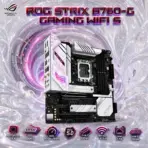
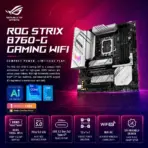
ASUS ROG STRIX B760G GAMING WIFI DDR5 MOTHERBOARD
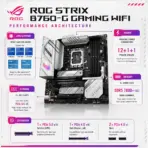
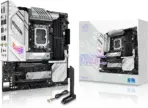
ASUS ROG Strix B760-G Gaming WiFi S Micro-ATX Motherboard, LGA 1700, 4x DDR5 7800+MT/s, PCIe 5.0, Dual M.2, WiFi 6E, 2.5GbE, USB-C 20Gbps and SupremeFX Audio, 14th / 13th / 12th Gen
B760-G B760-G B760-G B760-G B760-G B760-G B760-G B760-G B760-G B760-G B760-G B760-G B760-G B760-G
Generate an AI Image
Layout
- Create an exact 2048 × 2048-pixel, perfect 1:1 square website product-profile composition for the ASUS ROG Strix B760-G Gaming WiFi.
- Place the official ROG logo at the top-left and center “Strix B760-G Gaming WiFi” at the top.
- Forge the title from deeply extruded obsidian crystal with brushed black-titanium contours, frost-white highlights and a restrained crimson-violet energy core.
- Clearly separate the foreground, midground and background, preserving generous safe margins around the entire motherboard, logo, title, icons and scenery.
Product Presentation
- Use the supplied raw motherboard image as the strict visual reference.
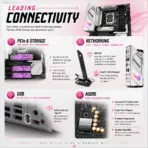
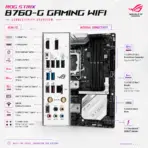
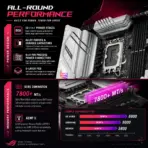
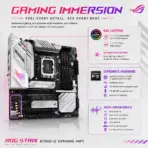
- Preserve the exact black PCB, white-and-silver heatsinks, integrated rear I/O cover, LGA 1700 socket, four DDR5 slots, PCIe 5.0 SafeSlot, secondary expansion slots, dual M.2 heatsinks, capacitors, connectors, printed graphics and ROG branding.
- Mount one complete motherboard naturally inside an open translucent micro-ATX gaming chassis at a refined three-quarter angle.
- Keep all major hardware visible; do not install RAM, GPU, processor cooler or SSDs over the board.
- Never place the motherboard on a stage, pedestal, floating slab or showroom platform.
Artistically Distinct and Detailed Background
- Create “The Strix Rift-Cathedral”, a surreal post-sale gaming chamber where the motherboard becomes the control map for an impossible competitive arena folding open around the PC.
- In the foreground, form an elegant translucent robotic falcon talon from conch-pearl glass, carefully guiding a thread of light toward the PCIe Q-Release without touching the real board.
- Let the PCIe 5.0 slot open into a vast horizontal hyperspace corridor made from razor-thin geometric frames, symbolising next-generation graphics bandwidth.
- Transform the four DDR5 slots into towering memory obelisks reflected in a liquid-crystal floor, while both M.2 positions launch compressed data streams through twin opaline tunnels.
- Above the WiFi module, build three orbital signal rings representing 2.4GHz, 5GHz and 6GHz connectivity.
- In the distant background, include subtle original tactical silhouettes crossing a fractured neon arena inspired by competitive esports—no identifiable copyrighted characters, logos or reproduced game screenshots.
- Visualise SupremeFX audio as clean concentric glass waves dissolving dark noise fragments before reaching a floating headset-shaped portal.
- Use dominant extremely lustrous pearlescent opaline-white, secondary opaline-silver, ROG crimson, restrained ultraviolet and icy-cyan accents.
- Use only two textures: conch-pearl micro-swirled relief and transparent pixel dichroic glass.
- Apply dramatic global illumination, precise caustic reflections, dielectric refractions, controlled RGB glow and layered volumetric light. Keep matte surfaces strictly minimal.
Icons — Bullet Listed
- 14th / 13th / 12th Gen Intel
- 4 x DIMM slots
- DDR5 — 192GB / 7800+MT/s
- PCIe 5.0 SafeSlot
- Dual M.2 — 64Gbps
- WiFi 6E + Bluetooth 5.3
- Intel 2.5Gb Ethernet
- USB-C — 20Gbps
- SupremeFX S1220A
- Create every icon as a completely different hollow freeform 3D crystal structure with bold condensed wording fully enclosed and readable at thumbnail scale.
- Align the icons vertically along the right side without obstructing the motherboard.
- CRITICAL DIRECTIVE [STRICT] The Icons MUST Have different shapes depending on the specific content of the icon
Output Requirements
- Render exactly 2048 × 2048 pixels with a perfect 1:1 square proportion.
- Keep every product edge, title, logo, icon and environmental element fully inside the canvas.
- Maintain extreme product sharpness, premium depth and clear e-commerce hierarchy.
Constraints
- Do not alter the motherboard layout or invent extra ports, slots, heatsinks, connectors or accessories.
- Do not cover the motherboard with artistic objects or allow its white accents to disappear into the background.
- Do not create a poster, banner, vertical layout, wide composition or cropped preview.
- Avoid cheap gaming typography, generic chrome, flat white emptiness, excessive matte materials, oversized characters and visual clutter.
- Before finalising, brutally evaluate: “How does this image fare as a product-profile image?” Automatically correct every weakness before output.