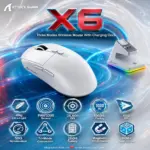

Attack Shark X6 Wireless Gaming Mouse – 49g, PAW3395, 26,000 DPI, 1000Hz, 650 IPS, 50G, Tri-Mode, 200H Battery, Kailh GM8.0, TTC Encoder and Magnetic RGB Charging Dock Combo | BLACK

26 $

EXPERT FEATURES

  • 49g Superlight Control : Weighing only 49g ±3g, the X6 gives you faster flicks, easier corrections, and less hand fatigue without cutting honeycomb holes into the shell.
  • Magnetic RGB Charging Dock : Place the mouse directly onto the included magnetic dock for convenient charging; a touch-sensitive control cycles the dock’s lighting effects for a cleaner battle station.
  • PixArt PAW3395 Sensor : The flagship sensor supports 800–26,000 DPI with six adjustable stages, covering disciplined precision aim and full-yalla high-speed movement.
  • 650 IPS Tracking : Handles violent swipes and fast directional changes at up to 650 IPS, keeping the cursor locked onto your movement when the match gets sweaty.
  • 50G Acceleration : Maintains accurate tracking through aggressive flicks and sudden hand movements with support for up to 50G acceleration.
  • Tri-Mode Connectivity : Switch between USB-C wired, low-latency 2.4GHz wireless, and flexible Bluetooth 5.2 using the rear connection-mode control.
  • Adjustable 125–1000Hz Polling : Select the reporting rate that fits your gaming or power requirements, with up to 1000Hz available for responsive competitive input.
  • Up to 200 Hours Battery Life : The rechargeable battery is rated for up to 200 hours of intermittent use, with approximately 2–3 hours required for a full charge.
  • Kailh GM8.0 Black Mamba Switches : Gold-plated three-pin microswitches are rated beyond 80 million clicks, delivering durable and crisp primary-button response.
  • TTC Scroll Encoder : The optimized TTC encoder provides defined scrolling, fast rebound, and precise weapon-switching control.
  • Programmable Driver Control : Customize DPI, polling rate, programmable buttons, and macro commands through Attack Shark’s dedicated X6 software.
  • Wide Platform Compatibility : Official support covers Windows 7/8/10/11, Mac, Android, and Xbox, giving the X6 excellent cross-device flexibility.
  • Solid Ergonomic Shell : The lightweight body avoids honeycomb perforations and is designed to accommodate multiple common mouse-holding styles.
  • Standard Black Configuration : This item is the regular Black variant—not the separately listed Black with Tape bundle.

EXPERT SPECS

Specification Attack Shark X6 Black Details
Brand Attack Shark
Model X6
 Color Black
Configuration Standard Black variant without the optional grip-tape bundle
Product Type Tri-mode wireless gaming mouse with magnetic charging dock
Mouse Weight 49g ±3g
Dimensions 118.3 × 62 × 37.3mm
Shell Design Lightweight solid shell without honeycomb perforations
Manufacturing Method Liquid-nitrogen cooling injection molding, according to Attack Shark
Sensor PixArt PAW3395
DPI Range 800–26,000 DPI
DPI Levels Six adjustable stages
Tracking Speed Up to 650 IPS
Acceleration Up to 50G
Polling-Rate Range 125–1000Hz
Connectivity USB-C wired, 2.4GHz wireless, and Bluetooth 5.2
Wireless Control Chip BK3633
Mode Switching Rear-mounted connection-mode control
Charging Accessory Included magnetic charging dock
Dock Lighting Integrated RGB lighting effects
Dock Control Touch-sensitive lighting-effect switch
Battery Life Up to 200 hours under simulated intermittent-use conditions
Full-Charge Time Approximately 2–3 hours
Main Switches Kailh GM8.0 Black Mamba, three-pin
Switch Lifespan More than 80 million clicks
Switch Release Force 25gf minimum
Switch Operating Force 65 ±10gf
Switch Conduction Travel 0.3 ±0.2mm
Manufacturer-Listed Touch Feeling 25%
Switch Contacts Gold-plated
Scroll-Wheel Encoder TTC encoder
Driver Attack Shark X6 downloadable software
Driver Controls DPI, polling rate, programmable buttons, macros, and other settings
Ergonomic Design Solid-body ergonomic construction for multiple common grip postures
Operating-System Compatibility Windows 7, Windows 8, Windows 10, Windows 11, Mac, Android, and Xbox
Standard Color Options Black, White, and Red
Optional Grip-Tape Versions Black with Tape, White with Tape, and Red with Tape
Manufacturer Weight Comparison Advertised as 30% lighter than G Pro X and 20% lighter than Aerox 3
Package Focus X6 mouse with magnetic RGB charging dock
Manufacturer Copy Note Two feature paragraphs mistakenly use “X3”; the title, selected variant, and Technical Specifications identify this product as X6

Features & Compatibility

X6-BLACK

ATTACK SHARK X6 TRIMODE WIRELESS MOUSE/OPTICAL/MAGNETIC RGB CHARGING BASE-BLACK

Attack Shark X6 Wireless Gaming Mouse – 49g, PAW3395, 26,000 DPI, 1000Hz, 650 IPS, 50G, Tri-Mode, 200H Battery, Kailh GM8.0, TTC Encoder and Magnetic RGB Charging Dock Combo | BLACK


GENERATE AN AI IMAGE

Layout

  • Create an exact 2048 × 2048-pixel, 1:1 square website product-profile composition with generous safe margins.
  • Separate the foreground mouse, midground precision mouse-pad surface, and background surreal tracking-and-charging environment.
  • Make the Attack Shark X6 Black dominant at approximately 50–57% of the canvas width.
  • Keep the mouse, magnetic dock, logo, title, subtitle, icons, effects, and footer fully inside the canvas.
  • Never create a poster, stage, pedestal, product podium, dark gaming room, cosmetics display, or cinematic advertisement.

Product Presentation

  • Use only the exact Attack Shark X6 Black reference.
  • Preserve the authentic black solid shell, proportions, seams, buttons, side controls, scroll wheel, contours, and physical construction.
  • Show one extremely sharp three-quarter mouse view resting naturally on a polished high-speed gaming surface.
  • Show the authentic magnetic RGB dock beside and slightly behind the mouse at no more than 18% of canvas width; never place the mouse on it like a display pedestal.
  • Place the official Attack Shark logo at the top-left.
  • Main title—use exactly: X6
  • Subtitle—use exactly: WIRELESS • TRI-MODE • MAGNETIC RGB DOCK
  • Centre both lines at the top, with the subtitle clearly smaller than the title and no overlap.

Product-Function Theme Lock

  • Category: tri-mode gaming mouse with magnetic charging dock.
  • Express precision tracking, rapid flicks, controlled stopping, wireless signal flow, and convenient recharging.
  • Highlight 49g, PAW3395, 26,000 DPI, 650 IPS, 50G, 1000Hz, and 200-hour rated battery life.
  • Use one unified concept: The High-Luster Opaline Vector-Charging Relay.

Artistically Distinct and Detailed Background

  • Make every visible background surface high-luster: desk, mouse-pad area, distant structures, tracking rails, charging field, and surrounding reliefs.
  • Use 70% pearlescent opaline-white and conch-pearl, 20–25% icy cyan and petrol-blue glass, and 5–10% controlled crimson accents.
  • Use polished caustic reflections, liquid-crystal shine, oily transparent luster, and heavy dielectric-glass refractions throughout.
  • Create a bright cyan-pearl halo behind the black mouse for complete edge separation.
  • No matte walls, matte floor, fabric mouse pad, graphite haze, black scenery, smoke, pink styling, or dull empty areas.

Icons — Bullet Listed

  • 49g Ultra-Light
  • PAW3395
  • 26,000 DPI
  • 1000Hz Polling
  • Tri-Mode
  • 200H Battery
  • Magnetic RGB Dock
  • 80M+ Clicks
  • CRITICAL DIRECTIVE [STRICT] The Icons MUST Have different shapes depending on the specific content of the icon

Output Requirements

  • Exact 2048 × 2048 pixels, extreme-resolution 3D rendering, sharp typography, and zero clipping.
  • Add: “Infographics Made with ❤️ by the Expert Zone Team”.

Constraints

  • Do not recolor or redesign the mouse.
  • Do not add RGB to the mouse, grip tape, honeycomb holes, extra buttons, or unsupported accessories.
  • Do not let the dock, title, subtitle, or icons compete with the mouse.
  • Never use matte-dominant or premium-ad-poster styling.

Final Quality-Control Inspection

  • Ask: “How does this image fare as a product-profile image?”
  • Reject results with dull background materials, dark scenery, oversized dock, weak title hierarchy, missing subtitle, soft mouse edges, or repeated icon shapes.