


THINKPAD-E14-GEN8
LENOVO THINKPAD E14 GEN8 21Y60025ED U7-355 16GB DDR5/512GB/14″/DOS-WITHBAG
Lenovo ThinkPad E14 Gen 8: Intel Core Ultra 7 355 | 16GB DDR5 RAM ; 512GB NVMe | Intel® Graphics | 14-inch WUXGA IPS Display | En/Ar Backlit Keyboard | DOS | Lenovo Bag Incl. | BLACK
Lenovo ThinkPad E14 Gen 8 21Y60025ED, Core Ultra 7 355, 16GB DDR5, 512GB NVMe, 14″ WUXGA IPS 400-Nit, Wi-Fi 7, Thunderbolt 4, Black
Generate an AI Image
- Layout
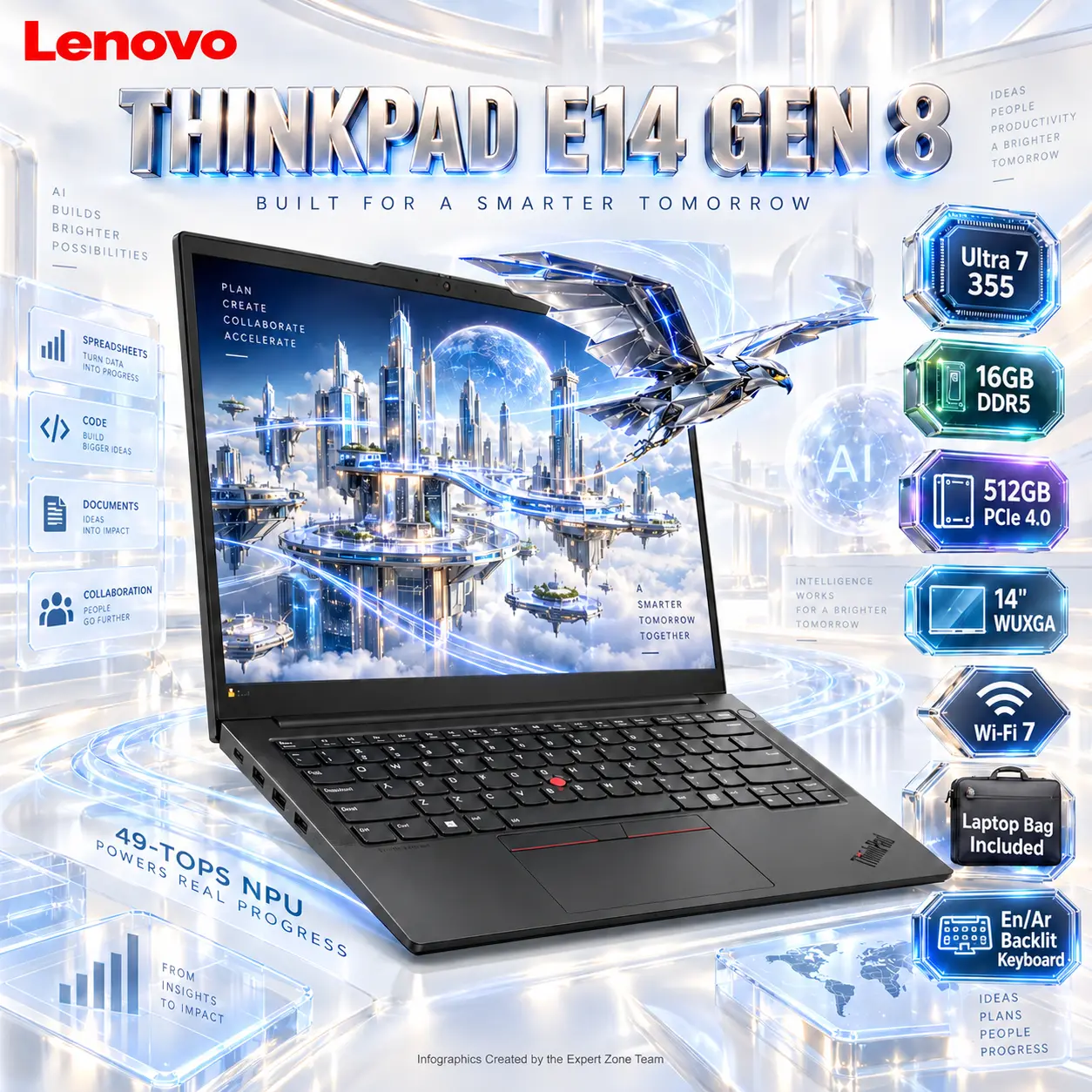
- Create an exact 2048 × 2048, perfect 1:1 square website product-profile composition for the Lenovo ThinkPad E14 Gen 8 21Y60025ED.
- Make the complete black ThinkPad the dominant hero, occupying approximately 68–72% of the useful canvas.
- Show the laptop open from a refined low front three-quarter angle, clearly revealing the 14-inch 16:10 display, iconic red TrackPoint, keyboard, large touchpad, thin aluminum body, hinge geometry, and side connectivity.
- Foreground: complete laptop.
- Midground: restrained AI-compute and productivity structures emerging around—not blocking—the keyboard and display.
- Background: an ultra-minimal surreal pearlescent AI cartography studio.
- Arrange icons as a vertical ribbon running from upper-right toward lower-right, leaving generous negative space.
- Product Presentation
- Use official ThinkPad E14 Gen 8 imagery as the strict physical reference.
- Preserve the exact black chassis, ThinkPad logo, red TrackPoint, screen ratio, keyboard proportions, hinge design, webcam housing, ports, and industrial ThinkPad identity.
- Place the Lenovo logo at the top-left.
- Center “THINKPAD E14 GEN 8” at the top in deeply extruded high-luster pearl-titanium typography.
- Use a localized pale silver-to-cobalt iridescent aura directly behind the black laptop only, keeping every edge crisp against the bright environment.
- Artistically Distinct and Detailed Background
- Fuse AI + professional efficiency + luxury engineering, not gaming-room clichés.
- Create a pristine surreal workspace resembling a white architectural strategy laboratory, where spreadsheets, maps, code, and neural-compute paths are translated into elegant translucent geometry.
- The laptop display must use a powerful forced-anamorphic portal illusion.
- Inside the screen, show a detailed futuristic strategy-game wallpaper: an immense metallic chrome-and-cobalt floating data city, transparent bridges, luminous planning grids, glass towers, and an origami-like mechanical falcon drone flying between the structures.
- The same falcon drone already visible inside the wallpaper must be caught halfway exiting the physical display, with its front wings and head volumetrically extending beyond the screen bezel while its rear body remains inside the digital world.
- Keep the extrusion sophisticated and secondary; the laptop itself must remain the dominant object.
- Surround the machine with thin neural-routing ribbons representing the 49-TOPS NPU, flowing toward work documents and collaboration nodes rather than gaming effects.
- Use exactly two texture families: deep conch-pearl opalescence and thick molded dichroic glass.
- Maintain a [MANDATORY] extreme high-luster pearlescent white environment with pale silver, controlled cobalt blue, ice cyan, and minute champagne reflections.
- No dark office, ordinary corporate desk, cyberpunk alley, masked warrior, cathedral, bounty hunter, generic hologram wall, or imagery reused from previous laptop concepts.
- Gaming hardware aesthetic Icons
- CRITICAL DIRECTIVE [STRICT] The Icons MUST Have different shapes depending on the specific content of the icon
- Ultra 7 355
- 16GB DDR5
- 512GB PCIe 4.0
- 14″ WUXGA
- Wi-Fi 7
- Laptop Bag Included
- Each icon is a DIFFERENT 3D Freeform badge The style is futuristic, industrial, and high-tech.
- Use realistic rendering with ray-traced reflections and lens flares.
- The icons must include specific technical text.
- Sharp typography, volumetric lighting, 8k resolution, cinematic composition.
- Lighting: “Chiaroscuro” (high contrast between white background and bright icons) and “anamorphic lens flares.”.
- Text to occupy maximum area of each icon, enhance readability and clarity of text.
- Text should be of maximum contrasting colors with respect to the badge, text is incorporated inside the icon
- Output Requirements
- Exact 2048 × 2048 pixels.
- Perfect 1:1 square outcome.
- Extreme high-resolution physical rendering.
- Keep the complete laptop, portal extrusion, logo, title, icons, and all artistic structures fully inside safe margins.
- Add discreetly at the bottom: “Infographics Created by the Expert Zone Team”.
- Constraints
- Preserve the exact ThinkPad E14 Gen 8 physical design.
- Do not invent a discrete NVIDIA GPU, OLED panel, touchscreen, 120Hz display, numeric keypad, SD card reader, cellular modem, or dedicated gaming RGB.
- Do not label the graphics as Intel Arc; this configuration is specified as Integrated Intel Graphics.
- Do not depict more than the actual 14-inch WUXGA 16:10 display.
- The screen portal must remain physically anchored to the display and must not overwhelm the laptop.
- No pedestal, stage, graphite fog, excessive matte surfaces, conventional premium-ad composition, or clutter.
- NEVER make it look like a premium ad poster.
- Before rendering, ask “How does this image fare as a product-profile image?” and automatically correct laptop proportions, TrackPoint visibility, screen ratio, port placement, portal perspective, icon readability, and black-product/background separation.