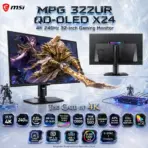
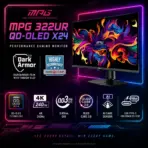


MSI MPG 322UR QD-OLED X24 31.5-Inch 4K 240Hz QD-OLED Gaming Monitor, 0.03ms, ClearMR 13000, DisplayHDR True Black 500, DarkArmor Film, G-SYNC, AMD FreeSync Premium Pro & KVM

1.228 $

BRAND-NEW SEALED ~ 6 MONTHS WARRANTY

Expert Features

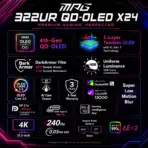
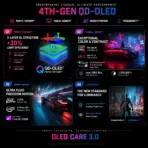
  • 4th-Generation Tandem QD-OLED : A five-layer Penta Tandem OLED structure with EL Gen 3 technology improves light efficiency by up to 30%, combining OLED-level blacks with vibrant quantum-dot color.
  • 4K at a Savage 240Hz : The 3840 × 2160 UHD panel delivers razor-sharp detail while the 240Hz refresh rate keeps competitive movement brutally smooth—cinematic resolution without surrendering speed.
  • Near-Instant 0.03ms Response : The 0.03ms GTG response time attacks ghosting and motion smearing, giving fast shooters, racing games, and high-speed action exceptional clarity.
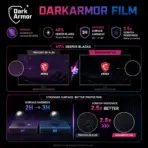
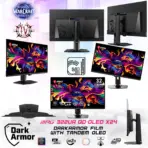
  • DarkArmor Film : MSI’s upgraded surface treatment absorbs more ambient light for up to 40% deeper blacks in bright rooms while raising surface hardness from 2H to 3H for 2.5× better scratch resistance.
  • True-Black HDR Impact : VESA DisplayHDR True Black 500 certification, 1000-nit peak HDR brightness, and a 1,500,000:1 typical contrast ratio deliver deep shadows, intense highlights, and proper OLED drama.
  • ClearMR 13000 Motion Clarity : VESA ClearMR 13000 certification verifies elite motion performance for sharp target tracking and cleaner movement at extreme frame rates.
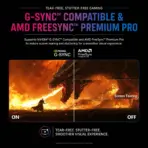
  • Premium Adaptive-Sync Support : NVIDIA G-SYNC Compatible and AMD FreeSync Premium Pro technologies help eliminate tearing and reduce stutter across the monitor’s 48–240Hz activated range.
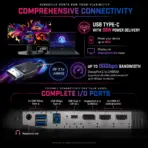
  • Full-Bandwidth DisplayPort 2.1a : DisplayPort 2.1a UHBR20 provides up to 80Gbps bandwidth and supports uncompressed 4K at 240Hz without relying on Display Stream Compression.
  • Console-Ready HDMI 2.1 : Two full-bandwidth HDMI 2.1 ports support UHD up to 240Hz, plus console-focused VRR, ALLM, and HDMI CEC functionality.
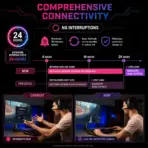
  • USB-C 98W Docking Power : USB-C handles DisplayPort Alt Mode, 4K 240Hz video, data connectivity, and up to 98W Power Delivery for compatible laptops and devices.
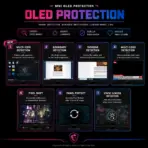
  • AI-Powered OLED Protection : MSI’s AI Care Sensor, OLED Care 3.0, static-screen detection, graphene film, and custom heatsink help reduce image-retention risk and protect panel longevity.
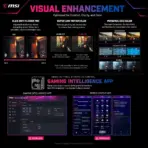
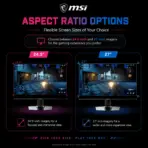
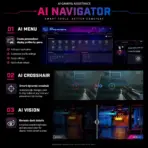
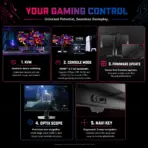
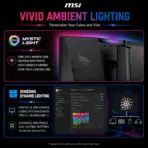
  • Complete Gaming Control Center : KVM, PIP/PBP, Gaming Intelligence, AI Crosshair, AI Vision, Optix Scope, aspect-ratio modes, Mystic Light, and Windows Dynamic Lighting turn this display into a full command station.

Expert Specs

Specification Value
Brand MSI
Model MPG 322UR QD-OLED X24
Product Category Premium OLED Gaming Monitor
Marketed Size 32-Inch Class
Viewable Panel Size 31.5 Inches
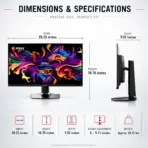
Active Display Area 699.48(H) × 394.73(V) mm
Screen Shape Flat
Panel Type 4th-Generation QD-OLED
OLED Structure Five-Layer Penta Tandem OLED
Emissive Technology EL Gen 3
Light-Efficiency Improvement Up to 30%
Resolution 3840 × 2160
Resolution Classification UHD / 4K
Aspect Ratio 16:9
Pixel Pitch 0.1814 × 0.1814mm
Refresh Rate 240Hz
Response Time 0.03ms GTG
Activated Refresh Range 48–240Hz
NVIDIA Synchronization G-SYNC Compatible
AMD Synchronization FreeSync Premium Pro
SDR Brightness 300 cd/m²
HDR Peak Brightness 1000 Nits
HDR Certification VESA DisplayHDR True Black 500
Typical Contrast Ratio 1,500,000:1
Motion Certification VESA ClearMR 13000
Signal Frequency 560.6–562.6kHz(H) / 48–240Hz(V)
Viewing Angles 178° Horizontal / 178° Vertical
Adobe RGB 97% CIE 1976
DCI-P3 99% CIE 1976
sRGB 138% CIE 1976
Color Accuracy Delta E ≤ 2
Display Colors 1.07 Billion
Color Depth 10-Bit
Surface Treatment Anti-Reflection With DarkArmor Film
Black-Level Improvement Up to 40%
Scratch-Resistance Improvement Up to 2.5×
Surface Hardness 3H
Frameless Design Supported
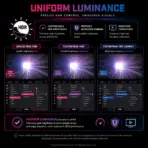
Uniform Luminance Customizable HDR Curves
OLED Protection OLED Care 3.0
Presence Detection AI Care Sensor With Local NPU Processing
Cooling Custom Heatsink and Graphene Film
OLED Anti-Flicker PRO Supported
HDMI 2 × HDMI 2.1
HDMI Maximum Signal 3840 × 2160 at Up to 240Hz
HDMI Bandwidth Full 48Gbps
DisplayPort 1 × DisplayPort 2.1a UHBR20
DisplayPort Bandwidth 80Gbps
DisplayPort Maximum Signal 3840 × 2160 at Up to 240Hz
USB-C 1 × USB-C With DisplayPort Alt Mode
USB-C Power Delivery Up to 98W
USB-C Maximum Signal 3840 × 2160 at Up to 240Hz
USB Downstream 2 × USB 5Gbps Type-A
USB Upstream 1 × USB 5Gbps Type-B
Audio Output 1 × Headphone-Out
KVM Supported
PIP / PBP Supported
HDMI CEC Supported
Console Mode Supported
Firmware Update Supported
Gaming Intelligence App Supported
Remote Display App Supported on Android
AI Crosshair Supported
AI Vision Supported
Optix Scope Supported
Aspect-Ratio Modes 24.5-Inch and 27-Inch Display Modes
Mystic Light Supported
Windows Dynamic Lighting Supported
Navigation Five-Way Joystick Navigator
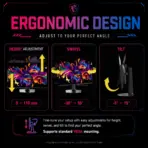
Tilt Adjustment -5° to 15°
Swivel Adjustment -30° to 30°
Minor Pivot Adjustment -10° to 10°
Height Adjustment 0–110mm
Full 90° Portrait Rotation Not Supported
VESA Mounting 100 × 100mm
Kensington Lock Supported
Power Type Internal Power Board
Power Input 100–240V, 50/60Hz
Dimensions With Stand 717.3 × 241.9 × 587.1mm
Dimensions Without Stand 717.3 × 71.8 × 434.8mm
Weight Without Stand 6.6kg
Net Weight 9.4kg
Gross Weight 14.8kg
Carton Dimensions 985 × 169 × 513mm
Included Cables DisplayPort 2.1a, HDMI 2.1, USB-C, USB Type-B to Type-A and C13 Power Cord
Additional Contents Quick Guide, Four VESA Screws, Fiber Cloth and Factory Color Report
Warranty  Including OLED Burn-In Coverage

**Warranty Disclaimer — Warranty Has Different Personalities**

Expert Zone receives products from different trusted sources, and each source may provide a different warranty timeline. That’s why warranty coverage can vary from item to item. This has nothing to do with authenticity — no fake mustaches here. We are always transparent about originality, condition, warranty, and any product notes before you buy.
Dead Pixel Policy: All our monitors are manufactured under strict quality standards. Due to the nature of modern display technologies —a small number of inactive or bright pixels may occasionally occur. Warranty coverage applies only if three (3) or more dead pixels are present. Fewer than three are considered within normal production tolerances.

Features & Compatibility

322UR-QD-OLED-X24

MSI MPG 322UR QD-OLED X24 MONITOR 32″ UHD 240HZ 4K 0.03MS-BLK

MSI MPG 322UR QD-OLED X24 31.5-Inch 4K 240Hz QD-OLED Gaming Monitor, 0.03ms, ClearMR 13000, DisplayHDR True Black 500, DarkArmor Film, G-SYNC, AMD FreeSync Premium Pro & KVM


Generate an AI Image

  • Layout
    • Create an exact 2048 × 2048-pixel, perfect 1:1 square website product-profile composition for the MSI MPG 322UR QD-OLED X24.
    • Clearly separate the foreground, midground, and background while keeping the complete monitor, MSI logo, title, icons, villain, and environmental effects fully inside generous safe margins.
    • Place the official MSI logo at the top-left.
    • Center “MPG 322UR QD-OLED X24 4K 240Hz 32-inch Gaming Monitor” at the top using refined, moderately sized three-dimensional extruded typography made from black diamond crystal, titanium edges, and restrained icy-cyan illumination.
    • Do not create a banner, stage, pedestal, wide composition, cropped preview, or cheap gaming poster.
  • Product Presentation
    • Use the official product images (Version 1 &  Version 2 )as the strict visual reference in the exact fucking positions in the attached image  .
    • The attached imaged features the monitor in two versions , feature both versions . Version 1 : the monitor in a Pivot position ( -10° ~ 10°) , the screen facing the front  .  Version 2 : the monitor in scenery horizontal position featuring the aura sync RGB lightening , the screen facing the back .
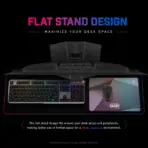
    • Preserve the exact 31.5-inch flat black monitor, ultrathin QD-OLED panel, rear housing, RGB lighting, flat stand, proportions, and port architecture.
    • Show (Version 1 &  Version 2 ) complete two monitors .
    • Display the attached high-detail  gaming scene “world-warcraft-with-msi-banner” on the screen.
    • [STRICT] The monitor display must act as a powerful physical anamorphic portal.
    • the already existing blond with gold armor warlord , selected from the screen scene “world-warcraft-with-msi-banner”, must appear halfway outside the monitor, physically breaching the OLED surface as a detailed volumetric action figure.
    • Give the villain cracked gold armor, ghostly fabric, sharp silhouette, and a raised energy weapon, with one half remaining inside the game world and the other entering the foreground.
    • Preserve full visibility of the monitor’s black well defines  and never allow the character to cover its key design.
  • Artistically Distinct and Detailed Background
    • Build the story “The Gate of 4K”, where the QD-OLED panel opens a forbidden portal inside an elite gaming battlestation.
    • Use a dominant extreme high luster pearlescent opaline-white environment  transparent oily iridescence, icy cyan, pale violet, and strictly tightly controlled  black-crystal accents.
    • Add sinister shadow spirits and restrained action figures interacting with the display, cables, and floating game fragments.
    • Use only two principal textures: deep high-gloss opalescent glass and dichroic crystalline structures with internal energy glow.
    • Create GOLD Armor-inspired crystalline reflective surfaces, luminous portal fractures, caustic reflections, dielectric refractions, and minimal matte detailing.
  • Icons — Bullet Listed
    • CRITICAL DIRECTIVE [STRICT] The Icons MUST Have different shapes depending on the specific content of the icon
    • Align bold, uniquely shaped, ultra-readable 3D icons horizontally at the bottom within two rows:
      • 31.5″ 4K
      • 240Hz
      • 0.03ms GTG
      • 4th-Gen QD-OLED
      • Five-Layer Tandem OLED
      • ClearMR 13000
      • True Black 500
      • DarkArmor Film
      • 40% Deeper Blacks
      • 2.5× Scratch Resistance
      • Delta E ≤ 2
      • 99% DCI-P3
      • AI CMOS Sensor
      • DP 2.1a UHBR20
      • USB-C 98W
      • OLED Care 3.0
      • G-SYNC + FreeSync
  • Output Requirements
    • Render exactly 2048 × 2048 pixels.
    • Add “Infographic Designed by the Expert Zone Team” in a super-small, discreet font.
  • Constraints
    • Do not alter the monitor, invent speakers, or add unsupported portrait rotation.
    • Do not allow the dark villain to make the overall image dark; the dominant Expert Zone palette must remain luminous and light.
    • Maintain premium gaming energy without becoming a generic cinematic advertisement.
    • Before finalizing, ask: “How does this image fare as a product-profile image?” Automatically correct all product-accuracy, hierarchy, clipping, contrast, and thumbnail-readability flaws.