


LS43FM702UUXXU
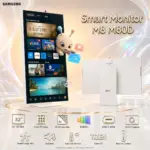
SAMSUNG MONITOR 43″4K UHD HDR10 WITH SPEAKERS 4MS 60HZ-BLK
Samsung Smart Monitor M7 M70F 43-inch 4K UHD Smart Display – Tizen, Smart TV Apps, Gaming Hub, HDR10, USB‑C 65W, 20W Speakers, Wi‑Fi 5, Bluetooth 5.2 & Remote | LS43FM702UUXXU
Samsung LS43FM702UUXXU 43″ 4K Ultra HD HDR10 Smart Monitor with Speakers – 3840×2160, USB-C, HDMI, WiFi, Bluetooth, Smart Hub for TV streaming, Catch Up Apps and Gaming Hub
GENERATE AN AI IMAGE
Layout
- Create an exact 2048 × 2048-pixel, perfect 1:1 square high-conversion website product-profile image using the supplied raw reference of the Samsung Smart Monitor M7 M70F 43-inch UHD Smart Monitor.
- This monitor has a simple non-pivot stand, so feature one large landscape monitor facing forward. Do not create a portrait version and do not invent a rear secondary version.
- Make the monitor the dominant foreground hero, occupying approximately 62–68% of the canvas.
- Keep the complete monitor, stand, Samsung logo, title, icons and portal effect fully inside generous safe margins.
- Place the Samsung logo at the top-left and center the primary title “Smart Monitor M7 M70F 4K 43-inch” at the top using huge, premium, razor-sharp, extruded 3D typography.
- center the secondary title “Smart Monitor M7 M70F 4K 43-inch”
Product Presentation
- Preserve the exact black chassis, ultra-slim display body, stand shape, bezel proportions and Samsung design language of the real product.
- Keep the product edges extremely crisp and clean.
- Because the monitor is black and the background must stay light, add a controlled refined halo only behind the monitor using a chic blend of soft gold, pale champagne, warm apricot and subtle cyan accents so the product separates clearly from the pearlescent background.
- Highlight the monitor as a smart lifestyle display, not as a gaming battle monitor. The design direction must feel like a fusion of luxury and functionality and a fusion of AI and efficiency.
Artistically Distinct and Detailed Background
- Build a super minimal, elegant, luminous luxury-tech background using extreme-high-luster pearlescent white, opaline fluid textures, refined transparent glass shapes, soft metallic reflections and sculptural curved forms.
- Keep the environment bright, premium and non-cluttered. No graphite smog, no muddy gray haze and no dark gaming-room atmosphere.
- The screen content must be bright, contrasting and visually rich, but still very elegant and chic, not childish or chaotic.
- Show a luxurious Smart TV Apps interface world inside the screen: elegant app tiles, streaming panels, content cards and floating UI ribbons arranged in a refined, high-end way.
- Use a rich chic display palette built from luminous teal, rich turquoise, polished gold, warm coral, apricot, refined magenta, soft sapphire and elegant amber highlights. The screen should feel vivid and contrasty, but still premium and tasteful.
Portal / Extrusion Direction
- Feature an ugly-cute golden metallic creature interacting with the Smart TV Apps.
- The creature should look adorable yet weird in a premium way: rounded body, slightly asymmetrical face, expressive eyes, small horns or antennae, stubby limbs, soft monster-like charm, and a glossy golden metallic finish with subtle pearlescent reflections.
- The creature must be shown holding the remote control included with the monitor in one hand or paw, while interacting with floating Smart TV app panels using the other.
- CRITICAL EXTRUSION DIRECTIVE [STRICT]: the creature must not look pasted flat on the display. The whole screen must behave like a true physical portal.
- The ugly-cute golden metallic creature must clearly originate from inside the Smart TV Apps scene and appear halfway through exiting the display.
- Make the extrusion unmistakable:
- The creature’s back half or lower half must remain clearly inside the screen environment.
- Its head, shoulders, one arm, and the hand holding the remote control must physically breach beyond the screen plane into real space.
- A few elegant floating app tiles, translucent interface ribbons and media cards should also be pulled partly out of the screen with it.
- The emerging parts must cast subtle shadows on the bezel and visually overlap the monitor frame.
- Use real occlusion, depth layering, cast shadows, perspective distortion and volumetric overlap so the creature looks truly caught midway out of the portal, not attached to the surface.
- The creature should feel playful, luxurious and smart rather than chaotic or silly.
- The screen must instantly communicate Smart TV Apps + premium smart entertainment + elegant colourful display quality.
Icons — Bullet Listed
- 43″ 4K UHD
- Smart TV Apps
- Samsung Vision AI
- Gaming Hub
- USB-C 65W
- 20W Speakers
- SmartThings Hub
- Wi‑Fi 5
- Bluetooth 5.2
- Remote Included
- CRITICAL DIRECTIVE [STRICT] The Icons MUST Have different shapes depending on the specific content of the icon.
- Use large, bold, hollow premium 3D icons with luxury-tech styling and highly readable text.
Output Requirements
- Exact 2048 × 2048 pixels, perfect 1:1 square.
- The monitor must remain the largest and sharpest object in the composition.
- Add discreetly at the bottom: “Infographics Created by the Expert Zone Team”.
Constraints
- No pivot composition.
- No second rear monitor.
- No dark gaming scenery.
- No cheap cartoon look.
- No pasted-flat creature.
- The extrusion must read as a true portal emergence with a clear inside/outside split.
- Keep the background dominantly white pearlescent, while the display itself remains bright, contrasting, elegant and chic.
- The final result must feel like a premium e-commerce product-profile image, not a poster or a random fantasy illustration.