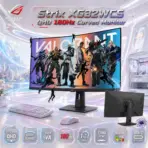
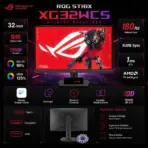
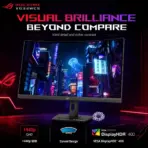
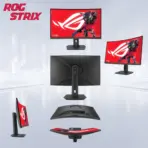

ASUS ROG Strix XG32WCS 31.5-Inch QHD 1500R Fast VA Gaming Monitor, 180Hz, 1ms GtG, HDR400, ELMB Sync, FreeSync, USB-C DP Alt Mode, DisplayPort 1.4 and HDMI 2.0

307 $

BRAND-NEW SEALED ~ 6 MONTHS WARRANTY

Expert Features

  • 31.5-Inch QHD Curved Display : The 2560 × 1440 resolution delivers significantly more detail and workspace than Full HD, while the 1500R curvature wraps the image naturally around your viewing position for a more immersive gaming experience.
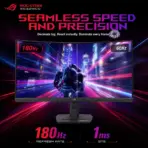
  • 180Hz Competitive Refresh Rate : Pushes up to 180Hz through DisplayPort or USB-C, delivering smoother aiming, tracking, racing, and rapid camera movement than ordinary 60Hz, 75Hz, or 144Hz monitors.
  • 1ms GtG Fast VA Performance : ASUS Fast VA technology combines a 1ms gray-to-gray response time with a strong 3500:1 native contrast ratio, giving you fast motion plus deeper blacks than typical IPS gaming panels.
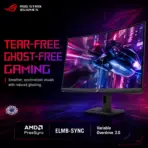
  • ELMB Sync Motion Clarity : Extreme Low Motion Blur Sync can operate alongside variable refresh rate to reduce ghosting and tearing during high-speed gameplay instead of forcing you to choose one technology or the other.
  • Adaptive-Sync and AMD FreeSync : Synchronizes compatible GPU frame output with the monitor’s refresh rate to reduce tearing, judder, and distracting frame interruptions.
  • VESA DisplayHDR 400 : Supports HDR with up to 400cd/m² peak brightness, 10-bit color output, and an officially listed HDR maximum contrast ratio of 100,000,000:1 for compatible content.
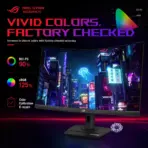
  • Wide-Gamut Color Coverage : Covers 90% DCI-P3 and 125% sRGB, with factory checking and a downloadable color-calibration e-report through DisplayWidget Center.
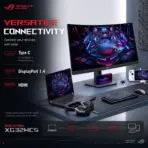
  • USB-C Display Connectivity : The USB-C port supports DisplayPort Alt Mode for compatible laptops, handhelds, tablets, and other video sources, simplifying video connectivity through one reversible connector. The source device must support DP Alt Mode.
  • 7.5W USB-C Power Delivery : Provides up to 7.5W through USB-C for compatible small devices; this is useful for light charging but should not be treated as full laptop-charging power.
  • DisplayPort and HDMI Support : Includes DisplayPort 1.4 HBR3 for up to 180Hz, HDMI 2.0 for up to 144Hz, and USB-C video input for flexible PC, console, and compatible-device connections.
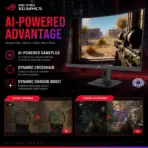
  • ROG Gaming AI Features : Dynamic Crosshair adjusts aiming visibility according to the scene, while Dynamic Shadow Boost improves dark-area visibility without heavily overexposing bright regions.
  • Variable Overdrive 2.0 : Dynamically adjusts overdrive behavior as frame rates change, helping balance motion clarity and overshoot across different games and performance levels.
  • Picture-in-Picture and Picture-by-Picture : PIP and PBP modes support viewing compatible sources together, making the monitor useful for multitasking, streaming setups, and multi-device workstations.
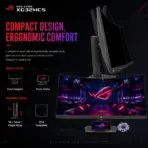
  • Compact Ergonomic Stand : Provides 110mm height adjustment, ±25° swivel, and −5° to +20° tilt, plus a built-in phone holder and a 1/4-inch tripod socket for compatible accessories.
  • DisplayWidget Center Control : Adjust gaming modes, image settings, and supported monitor functions through a mouse-controlled interface instead of repeatedly fighting the physical monitor controls.

Expert Specs

Specification Value
Brand ASUS ROG
Product Line ROG Strix
Exact Model / SKU XG32WCS
Product Type Curved Gaming Monitor
Marketed Screen Size 32 Inches
Viewable Panel Size 31.5 Inches
Screen Curvature 1500R
Panel Type Fast VA
Native Resolution 2560 × 1440
Resolution Classification QHD / WQHD / 1440p
Aspect Ratio 16:9
Display Viewing Area 697.344 × 392.256mm
Display Surface Anti-Glare
Pixel Pitch 0.272mm
Maximum Refresh Rate 180Hz
HDMI Maximum Listed Refresh Rate 144Hz
DisplayPort Maximum Listed Refresh Rate 180Hz
USB-C Maximum Listed Refresh Rate 180Hz
Response Time 1ms GtG
Typical Brightness 350cd/m²
HDR Peak Brightness 400cd/m²
Typical Contrast Ratio 3500:1
HDR Maximum Contrast Ratio 100,000,000:1
Viewing Angles 178° Horizontal / 178° Vertical
Display Colors 1.0737 Billion
Listed Color Depth 10-Bit
DCI-P3 Coverage 90%
sRGB Coverage 125%
HDR Support Yes
HDR Certification VESA DisplayHDR 400
Flicker-Free Yes
Low Blue Light Certification TÜV Low Blue Light
Variable Refresh Rate Adaptive-Sync
AMD Sync Support AMD FreeSync
VESA VRR Certification VESA AdaptiveSync Display 180Hz
Extreme Low Motion Blur Yes
ELMB Sync Yes
Variable Overdrive Variable Overdrive 2.0
GamePlus Yes
GameVisual Yes
Shadow Boost Yes
ROG Gaming AI Dynamic Crosshair and Dynamic Shadow Boost
Aspect Control Yes
Picture-in-Picture Yes
Picture-by-Picture Yes
Monitor-Control Software ASUS DisplayWidget Center
Color-Calibration E-Report Available Through DisplayWidget Center
DisplayPort 1 × DisplayPort 1.4 HBR3
HDMI 1 × HDMI 2.0
USB-C 1 × USB-C With DisplayPort Alt Mode
USB-C Power Delivery Up to 7.5W
USB-C Compatibility Requirement Source Device Must Support DisplayPort Alt Mode for Video
Earphone Output Yes
PC Audio Input Yes
Built-In Speakers No
HDMI Signal Frequency 30–223kHz Horizontal / 48–144Hz Vertical
DisplayPort Signal Frequency 415kHz Horizontal / 48–180Hz Vertical
USB-C Signal Frequency 415kHz Horizontal / 48–180Hz Vertical
Maximum Power Consumption Below 50W
Power-Saving Consumption Below 0.5W
Power-Off Consumption Below 0.3W
Input Voltage 100–240V AC, 50/60Hz
Height Adjustment 0–110mm
Tilt Adjustment −5° to +20°
Swivel Adjustment −25° to +25°
Pivot Adjustment Not Listed
VESA Wall Mount 100 × 100mm
Tripod Socket 1/4-Inch
Stand Phone Holder Yes
Security Kensington Lock
Dimensions With Stand 708 × 573 × 246mm
Dimensions Without Stand 708 × 425 × 108mm
Box Dimensions 920 × 562 × 235mm
Net Weight With Stand 9.4kg
Net Weight Without Stand 6.1kg
Gross Weight 12.2kg
Included Display Cable DisplayPort Cable
Included Power Accessory Power Cord
Additional Included Items Quick-Start Guide, ROG Pouch, ROG Sticker and Warranty Card
Packaging Material 100% Recycled Cardboard
Certifications TÜV Flicker-Free, TÜV Low Blue Light, VESA AdaptiveSync Display 180Hz, VESA DisplayHDR 400, AMD FreeSync and FSC MIX
Accessory Notice Included Accessories May Vary by Region

**Warranty Disclaimer — Warranty Has Different Personalities**

Expert Zone receives products from different trusted sources, and each source may provide a different warranty timeline. That’s why warranty coverage can vary from item to item. This has nothing to do with authenticity — no fake mustaches here. We are always transparent about originality, condition, warranty, and any product notes before you buy.
Dead Pixel Policy: All our monitors are manufactured under strict quality standards. Due to the nature of modern display technologies —a small number of inactive or bright pixels may occasionally occur. Warranty coverage applies only if three (3) or more dead pixels are present. Fewer than three are considered within normal production tolerances.

Features & Compatibility

XG32WCS

ASUS ROG STRIX XG32WCS USB Type-C MONITOR 32″Curved 180Hz 1ms FAST VA-BLK

ASUS ROG Strix XG32WCS 31.5-Inch QHD 1500R Fast VA Gaming Monitor, 180Hz, 1ms GtG, HDR400, ELMB Sync, FreeSync, USB-C DP Alt Mode, DisplayPort 1.4 and HDMI 2.0


Generate an AI Image

Layout

  • Create an exact 2048 × 2048-pixel, perfect 1:1 square website product-profile composition for the ASUS ROG Strix XG32WCS curved gaming monitor.
  • Place the official ROG logo at the top-left, accurately proportioned and completely contained within generous safe margins.
  • Center “Strix XG32WCS QHD 180Hz Curved Monitor” at the top using refined, moderately sized, three-dimensional extruded typography.
  • Construct the title from dark smoked crystal, black titanium, and restrained ROG-red and spectral-violet accents so it remains sharply separated from the pale environment.
  • Clearly divide the foreground, midground, and background while keeping the monitor, stand, title, logo, icons, and environmental structures fully inside the square canvas.
  • Do not create a poster, banner, vertical composition, wide layout, cropped preview, or cheap gaming-poster typography.

Product Presentation

  • Use the official ROG Strix XG32WCS product imagery as the strict visual reference.
  • Preserve the exact black 31.5-inch curved display, 1500R curvature, slim bezel proportions, rear housing, compact ergonomic stand, base geometry, phone-holder groove, 1/4-inch tripod socket, ventilation, and physical finishes.
  • Present one complete monitor large in the midground at a clean front three-quarter angle on a realistic gaming desk.
  • Display an original, non-branded competitive racing and tactical environment communicating QHD clarity, 180Hz fluidity, deep Fast VA contrast, and HDR highlights.
  • Include a smaller rear-angle detail without inventing or relocating ports.
  • Do not add speakers, a webcam, USB-A hub ports, KVM functionality, or high-wattage laptop charging.
  • [STRICT] The monitor is displaying the scene “Valorant-Wallpaper-Boys-Rainbow-Display_a94881d6-c6a5-4245-9da6-8f07c55a48d1″ , The key artistic effect is a powerful, physical anamorphic illusion where the display area acts as a window portal. A three-dimensional model of [little black character silhouettes ] must appear to be physically extruding and escaping from the surface of the screen, breaching and flowing into the surrounding space as a volumetric, detailed structure. the [little black character silhouettes ] should look likethey’re caught in the middle of the action of ” half the way exiting the screen” in FORCED anamorphic illusion .  some of the little black character silhouettes are hanging from the bezel , others are leaping out , one of them is actively interacting with monitor .

Artistically Distinct and Detailed Background

  • Create a surreal post-sale curved gaming-desk environment where flowing motion paths bend naturally around the monitor’s 1500R arc.
  • Use mandatory dominant pearlescent opaline-white with secondary opaline-silver, icy cyan, spectral violet, graphite, and restrained ROG-red accents.
  • Use only two texture families:  deep rich extremely lustrous conch-pearl micro-swirled surfaces and thick dichroic-glass motion structures.
  • MANDATORY Thematic Storytelling:  near-future Earth altered by a global event known as the “First Light” and the discovery of the substance “Radianite”. Environments range from an underwater city in Portugal (Pearl) to a tropical island (Breeze). Despite the sci-fi and supernatural elements, real-world architecture, infusing maps with rich cultural history, abandoned sites, and subtle environmental lore
  • Keep matte finishes extremely minimal.

Icons — Numbered and Listed

  • 31.5-Inch QHD
  •  1500R Curved
  •  Fast VA
  •  180Hz
  •  1ms GtG
  •  ELMB Sync
  •  DisplayHDR 400
  •  USB-C DP Alt Mode
  • Align the esports icons horizontally along the bottom using different hollow 3D crystal forms.
  • Keep the typography of every icon ultra-readable when the complete image is reduced to website-thumbnail size.
  • CRITICAL DIRECTIVE [STRICT] The Icons MUST Have different shapes depending on the specific content of the icon

Output Requirements

  • Render at exactly 2048 × 2048 pixels with a perfect square 1:1 ratio.
  • Use extreme-resolution rendering, accurate curvature, realistic black materials, crisp typography, and strong website-thumbnail readability.
  • Keep every element fully inside safe margins.

Constraints

  • Do not alter the monitor design, curvature, stand, color, ports, or proportions.
  • Do not invent built-in speakers, USB-A ports, KVM, pivot adjustment, 4K resolution, or high-power USB-C charging.
  • Do not place the monitor on a stage or pedestal.
  • Never make the result resemble a conventional premium advertising poster.
  • Before rendering, ask: “How does this image fare as a product-profile image?” Automatically correct every product error, clipping risk, text mistake, and composition flaw.