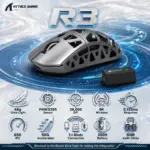



R3-BLACK
ATTACK SHARK PAW 3395 BLACK WIRELESS TRIMODE R3 MOUSE 8K HZ LOW LATENCY LIGHTWEIGHT
Attack Shark R3 8K Magnesium-Alloy Gaming Mouse – 46g, PAW3395, 26,000 DPI, 650 IPS, 50G, 8K Wireless, Tri-Mode, BT 5.2, 200H Battery, Kailh GM 8.0, TTC Encoder and PTFE Feet | BLACK
GENERATE AN AI IMAGE
- Layout
- Create an exact 2048 × 2048-pixel, 1:1 square e-commerce product-profile composition.
- Separate the foreground mouse, midground mouse-pad surface, and background tracking laboratory.
- Make the Attack Shark R3 Black dominant at 52–58% of canvas width.
- Keep the mouse, nano dongle, logo, title, icons, and footer inside safe margins.
- Never create a poster, stage, pedestal, dark gaming room, or cinematic advertisement.
- Product Presentation
- Use only the exact supplied Attack Shark R3 Black reference.
- Preserve the authentic black magnesium-alloy and plastic construction, CNC-integrated hollow frame, geometric openings, contours, buttons, scroll wheel, side controls, proportions, and details.
- Render crisp metallic depth, refined micro-texture, realistic highlights, and clean internal shadows.
- Show one razor-sharp three-quarter view on a technically refined opaline glass-fiber mouse pad.
- Display the included 8K nano dongle as a secondary accessory occupying no more than 8% of canvas width.
- Place the Attack Shark logo at top-left and centre R3 above the product in restrained pearl-silver extruded typography with an icy-cyan edge.
- Product-Function Theme Lock
- Category: ultralight tri-mode competitive gaming mouse.
- Main function: precision tracking, rapid flicks, smooth glide, and ultra-fast wireless reporting.
- Strongest benefits: 46g ±2g, PAW3395, 26,000 DPI, 650 IPS, 50G, and 8000Hz wireless polling.
- Connectivity: wired, 2.4GHz wireless, and Bluetooth 5.2.
- Use one unified concept: The Extreme High-luster Opalescent 8K Tracking Wind Tunnel.
- Visualize motion through sensor grids, aerodynamic ribbons, stopping markers, and one signal path toward the dongle.
- Artistically Distinct and Detailed Background
- Use 65–70% pearlescent High-luster opaline-white and conch-pearl, 20–25% icy iridescent cyan and metallic petrol blue, and 5–10% shimmering emerald-violet accents.
- Keep black restricted to the mouse and tiny functional details.
- Place a concentrated cyan-petrol caustic zone behind the shell for complete edge separation.
- Build substantial dichroic-glass airflow vanes and polished tracking rails.
- Use only opalescent transparent glass and conch-pearl micro-swirled high-luster material.
- No graphite fog, black walls, decorative bubbles, smoky bloom, or matte-dominant surfaces.
- Icons — Bullet Listed
- 46g Ultra-Light
- PAW3395 Sensor
- 26,000 DPI
- 8K Wireless
- 0.125ms Response
- 650 IPS
- 50G Acceleration
- Tri-Mode Connection
- 200H Battery
- 80M Kailh Clicks
- Use unique feature-specific hollow 3D forms in two spacious rows.
- CRITICAL DIRECTIVE [STRICT] The Icons MUST Have different shapes depending on the specific content of the icon
- Output Requirements
- Exact 2048 × 2048 pixels with extreme-resolution rendering, razor-sharp edges, readable text, and no clipping.
- Add: “Infographics Made with ❤️ by the Expert Zone Team”.
- Constraints
- Do not recolor, reshape, soften, simplify, or invent any part.
- Do not add RGB, a charging dock, unsupported accessories, or unverified compatibility.
- Do not let the title, dongle, icons, or background compete with the mouse.
- Final Quality-Control Inspection
- Ask: “How does this image fare as a product-profile image?”
- Reject any result where the mouse is too small, blends into dark scenery, looks like plastic, has an oversized dongle, or uses repeated icon shapes.