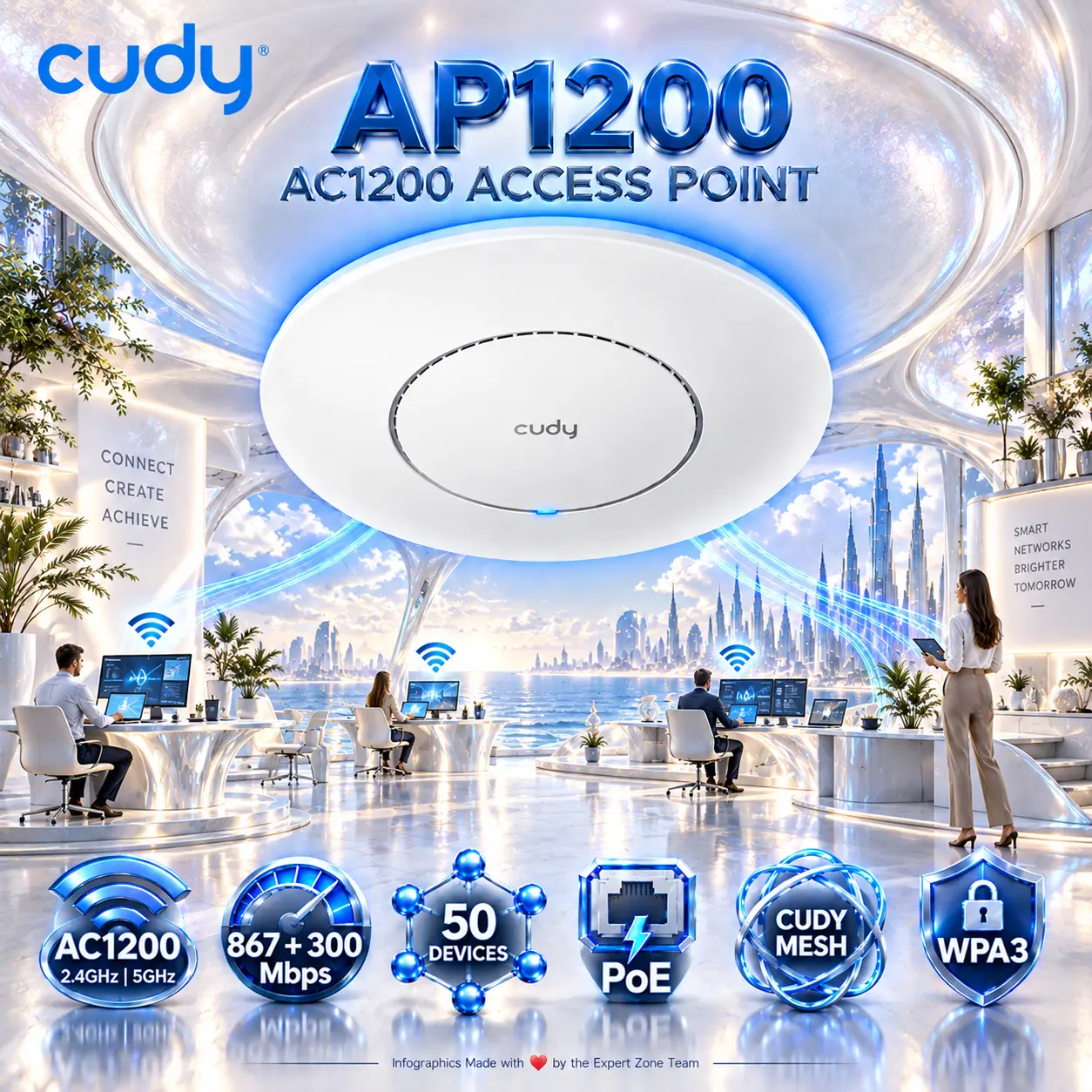



AP1200-INDOOR
CUDY AP1200 AC1200 DUAL BAND POE WIIF INDOOR WIRELESS ACCESS POINT
Cudy AP1200 1.0 AC1200 Dual-Band Wi-Fi 5 Access Point, 867 + 300 Mbps, 4 Internal Antennas, MU-MIMO, Beamforming, Mesh, WPA3, 802.3af/at PoE, 5 Modes, Wall/Ceiling Mount, DC Adapter
Generate an AI Image
Layout
-
Create an exact 2048 × 2048, perfect 1:1 square website product-profile composition for the Cudy AP1200 1.0.
-
Foreground: the complete access point, occupying 68–72% of the useful canvas, presented in a refined, slightly angled three-quarter perspective.
-
Midground: a discreet architectural ceiling connection. Background: a surreal interconnected workspace.
-
Keep every component fully inside generous safe margins.
Product Presentation
-
Use the official AP1200 1.0 product image as the strict physical reference. Preserve its circular white housing, exact concentric design, Cudy branding, proportions and indicator.
-
Render with extreme-resolution 3D precision and razor-sharp peripheral outlines.
-
Add the official Cudy logo at the top-left and centered extruded title “AP1200 AC1200 ACCESS POINT” in bold, contrasting cobalt-blue metallic typography.
Artistically Distinct and Detailed Background
-
Story: a futuristic office built inside an enormous luminous conch-pearl shell. The AP1200 is naturally installed beneath a sweeping architectural ceiling. Two elegant, transparent wireless-signal ribbons extend toward three miniature workstation islands containing restrained silhouettes of connected devices.
-
A single delicate, dark-indigo glass network architect stands beside a miniature desk, guiding one luminous signal ribbon toward a connected laptop. This figure is an artistic metaphor, not a product feature.
-
Use an overwhelmingly high-luster pearlescent-white environment with restrained liquid-silver highlights.
-
Restrict major texture families to richly layered conch-pearl and deep transparent iridescent oil.
-
Place a localized cobalt-blue aura directly behind and underneath the white product. Maintain exceptionally sharp outer edges and strong separation from the surroundings.
-
Use sculptural curves, dielectric refractions, precise caustic highlights and refined global illumination. Preserve large, clean negative-space areas.
Icons — Bullet Listed
-
AC1200: split-frequency electromagnetic sculpture.
-
867 + 300 Mbps: paired speed-wave sculpture.
-
50 DEVICES: interconnected node constellation.
-
PoE: angular Ethernet lightning sculpture.
-
CUDY MESH: interlocking orbital network sculpture.
-
WPA3: geometric encryption-key sculpture.
-
CRITICAL DIRECTIVE [STRICT] The Icons MUST Have different shapes depending on the specific content of the icon
-
Arrange six independent, hollow, extruded 3D icons horizontally along the bottom. Embed large, bold, ultra-readable technical typography inside each unique freeform.
Output Requirements
-
Exactly 2048 × 2048 pixels, perfect square.
-
Keep the complete product, logo, title, icons and footer inside safe margins.
-
Add “Infographics Made with ❤️ by the Expert Zone Team” in discreet, super-small typography.
-
Optimize product recognition and technical readability at website-thumbnail size.
Constraints
-
Never alter the actual product geometry or invent external antennas, ports or unsupported capabilities.
-
Do not depict a PoE injector as included. Show the DC adapter only if needed and accurately referenced.
-
No pedestal, poster layout, graphite smog, clutter, cheap plastic, generic chrome or excessive matte surfaces.
-
Inspect product fidelity, typography, icon readability and edge sharpness; correct all imperfections before final output.