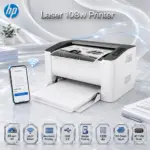


HP Laser 108a Mono (BLACK & WHITE) Laser Printer, A4, USB 2.0, 20 ppm, 1200 dpi, 150-Sheet Input, Manual Duplex, 110A Toner, 64 MB Memory, 400 MHz, Compact Business Design  | WHITE ~ 4ZB79A

123 $

Expert Features

  • USB-Only Laser Reliability : The HP Laser 108a is built for direct, stable USB printing—no wireless confusion, no network drama, just plug it in and print like a serious office machine.
  • Sharp Black Text Output : Delivers crisp mono text, bold blacks, and clean graphics, making invoices, reports, quotations, labels, and daily paperwork look clean and professional.
  • Fast A4 Printing : Prints black A4 documents at up to 20 ppm, so your small office or counter setup does not get stuck waiting on basic paperwork.
  • High-Resolution Laser Detail : Supports up to 1200 × 1200 dpi black best resolution, giving sharper document clarity than basic entry-level inkjet chaos.
  • Compact Space-Saving Body : With a 331 × 215 × 178 mm footprint, this tiny laser beast fits easily on desks, shop counters, cashier zones, and tight office corners.
  • Small-Team Business Ready : Designed for 1–5 users, with a recommended monthly print volume of 100 to 1,500 pages—perfect for small teams that print daily but hate bulky machines.
  • Up To 10,000-Page Monthly Duty Cycle : Built with a monthly A4 duty cycle up to 10,000 pages, giving this compact unit proper office backbone.
  • Manual Duplex Support : Supports manual double-sided printing through the driver, helping you reduce paper use when printing internal documents.
  • 150-Sheet Input Tray : Handles up to 150 sheets in the input tray, so you are not refilling paper every five minutes like it’s a mini-game.
  • 100-Sheet Output Bin : Keeps printed documents organized with a 100-sheet output bin for smoother office workflow.
  • Wide Media Compatibility : Supports A4, A5, A5 LEF, B5 JIS, Oficio, envelopes, labels, cardstock, bond paper, archive paper, and more.
  • HP 110A Toner System : Uses one black HP 110A toner cartridge, with listed replacement cartridges W1110A and W1112A at approximately 1,500-page yield.
  • Simple Control Panel : Includes Power and Cancel buttons, plus LED indicators for Power, Toner, and Attention—clean, direct, and easy to understand.
  • Efficient Built-In Power Supply : Uses an internal built-in power supply with HP Auto-Off Technology and Power Save support for cleaner energy behavior.


Expert Specs

Specification Value
Product Name HP Laser 108a Printer
Product Number / SKU 4ZB79A
Product Series HP Laser 108 Printer Series
Product Type Mono Laser Printer
Number Of Users 1–5 Users
Functions Print only
Wireless Function Not available
Mobile Printing Not available
Print Technology Laser
Print Color Black / Monochrome
Print Speed Black, normal, A4: Up to 20 ppm
First Page Out Black, A4, ready: As fast as 8.3 seconds; Black, A4, sleep: As fast as 18 seconds after 15 minutes
Print Resolution Black best: Up to 1200 × 1200 dpi; Black normal: Up to 600 × 600 dpi
Duplex Printing Manual, driver support provided
Standard Print Language SPL
Display LED
Control Panel Buttons: Power, Cancel; LED indicator lights: Power, Toner, Attention
Processor Speed 400 MHz
Memory 64 MB standard / maximum
Monthly Duty Cycle, A4 Up to 10,000 pages
Recommended Monthly Page Volume 100 to 1,500 pages
Target Usage Small teams / 1–5 users, up to 1,500 recommended pages per month
Paper Trays, Standard 1
Paper Trays, Maximum 1
Input Capacity 150-sheet input tray
Output Capacity 100-sheet output bin
Supported Media Sizes A4; A5; A5 LEF; B5 JIS; Oficio; Envelope DL, C5; 76 × 127 to 216 × 356 mm
Supported Media Weight 60 to 163 g/m²
Supported Media Types Plain, Thick, Thin, Cotton, Colour, Preprinted, Recycled, Labels, CardStock, Bond, Archive, Envelope
Connectivity, Standard Hi-Speed USB 2.0 port
Network Connectivity Not available
Wireless Capability Not available
Supported Network Protocols Not available
Security Management Not available
Number Of Print Cartridges 1 black
Replacement Cartridge HP 110A Black Original Laser Toner Cartridge, W1110A, approximately 1,500 pages, China Only
Replacement Cartridge HP 110A Black Original Laser Toner Cartridge, W1112A, approximately 1,500 pages, India Only
Introductory Cartridge Preinstalled introductory HP Laser Black print cartridge, approximately 1.5K pages, CH/IN
Operating System Compatibility Windows 7 32/64-bit; Windows Server 2008 R2; Windows 8 32/64-bit; Windows 8.1 32/64-bit; Windows 10 32/64-bit; Windows Server 2012; Windows Server 2016
Minimum PC Requirements Windows 7 or newer; Intel Pentium IV 1 GHz 32-bit or 64-bit processor or higher; 1 GB RAM; 16 GB HDD
Acoustic Power Emissions Active printing: 6.5 B(A)
Operating Temperature Range 10 to 30°C
Recommended Operating Temperature 15 to 27°C
Operating Humidity Range 10 to 80% RH, non-condensing
Recommended Operating Humidity 20 to 70% RH, non-condensing
Storage Temperature Range -20 to 40°C
Energy Saving Technology HP Auto-Off Technology; Power Save
Power Supply Type Internal built-in power supply
Power Supply Required 110 to 127 VAC, 50/60 Hz; 220 to 240 VAC, 50/60 Hz
Power Consumption 320 watts active printing; 33 watts ready; 1.1 watts sleep; 0.2 watts manual off; 0.2 watts auto off/manual on
Typical Electricity Consumption 0.731 kWh/week BA; 0.775 kWh/week ES
Dimensions 331 × 215 × 178 mm
Weight 4.18 kg
Warranty One-year limited hardware warranty
— —
What’s In The Box HP Laser 108a Printer; preinstalled introductory HP Laser Black print cartridge approximately 1.5K pages CH/IN; Setup Guide; Reference Guide; Regulatory Statements Flyer; Power cord; USB cable

Features & Compatibility

4ZB79A

HP LASER 108A PRINTER A4 BLACK&WHITE/USB CONNECTIVITY/21 ppm

HP Laser 108a Mono (BLACK & WHITE) Laser Printer, A4, USB 2.0, 20 ppm, 1200 dpi, 150-Sheet Input, Manual Duplex, 110A Toner, 64 MB Memory, 400 MHz, Compact Business Design  | WHITE ~ 4ZB79A


Generate An AI Image

Layout

  • Create a clean, premium website product-profile composition for the HP Laser 108a Printer.
  • Build the final image as an exact 2048 × 2048 pixel, perfect 1:1 square composition.
  • Clearly separate the foreground, midground, and background.
  • Keep the printer, HP logo, product title, USB cable detail, printed paper, icons, and all text fully inside the canvas with generous safe margins.
  • Do not create a poster, banner, vertical layout, wide layout, cropped preview, stage-style product shot, or pedestal display.
  • Do not use cheap gaming poster typography or oversized premium ad-poster title styling.

Product Presentation

  • Use the attached raw product image as the strict visual reference.
  • Show one HP Laser 108a Printer only, large and dominant in the midground.
  • Preserve the compact white-and-black laser printer body, top output area, front HP badge, simple non-wireless control panel, and small office-friendly proportions.
  • Present it as a real post-sale USB office printer naturally placed on a clean desk or shop-counter surface.
  • Add a visible USB 2.0 cable connection detail leading toward a nearby office laptop or desktop edge, emphasizing wired USB reliability.
  • Place the HP logo at the top-left, fully inside safe margins.
  • Center the product name “Laser 108a Printer” at the top using refined, smaller-scale, elegant 3D extruded typography with clean spacing, premium depth, and strong contrast against the background.
  • prevent the title from blending in with the background

Artistically Distinct And Detailed Background

  • Build a surreal minimal office-printing environment that visually expresses direct USB productivity, clean black text output, compact business workflow, and paper movement.
  • Use a dominant pearlescent opaline-white background with subtle opaline-silver and very soft icy-blue accents.
  • Add abstract curled reliefs, layered organic contours, and soft paper-like waves flowing behind the printer.
  • Use a maximum of two texture styles: conch-pearl micro-swirled surfaces and transparent dichroic-glass document ribbons.
  • Keep the background luxurious, tactile, minimalistic, high-gloss, and product-friendly without blending into the white printer.
  • Use matting strictly minimally; reserve matted surfaces only for definition and detail; MATT is ugly. I hate it!

Icons — Numbered And Listed

  • CRITICAL DIRECTIVE [STRICT] The Icons MUST Have different shapes depending on the specific content of the icon
  • Align icons horizontally at the bottom with every badge fully inside safe margins.

    1. 20 ppm A4

    1. USB 2.0

    1. Monochrome Laser

    1. 1200 dpi

    1. Manual Duplex

    1. 150-Sheet Input

    1. 100-Sheet Output

    1. HP 110A Toner

Output Requirements

  • Final image must be exactly 2048 × 2048 pixels.
  • Final image must have a perfect 1:1 square ratio.
  • Use extreme high resolution throughout the product, text, icons, USB detail, paper, and background.
  • Use ultra-clear 3D extruded FRAMELESS icons .
  • Prevent the title, icons, and white printer body from blending into the opaline-white background.
  • Keep every element fully inside the canvas with safe margins.

Constraints

  • Do not alter the product design.
  • Do not show HP Laser 108w or any other printer model.
  • Do not show Wi-Fi signals, mobile phone printing, HP Smart app, AirPrint, Mopria, Wi-Fi Direct, wireless buttons, scanner bed, copier, fax, color printing, Ethernet, or auto-duplex.
  • Do not invent unsupported features.
  • Do not allow the white printer to blend into the background.
  • Do not create a premium ad poster look.
  • Avoid flat white emptiness, generic chrome, cheap plastic, excessive matte surfaces, tackiness, and clutter.