

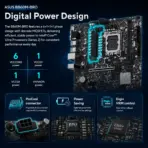
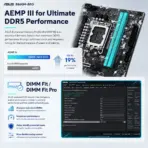




ASUS-B860M-BRO
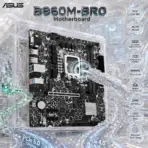
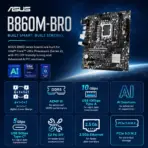
ASUS B860M-BRO DDR5 MOTHERBOARD
ASUS B860M-BRO Micro-ATX Motherboard, Intel LGA 1851, 2x DDR5 128GB 8800+MT/s OC, PCIe 5.0 M.2, 2.5Gb Ethernet, HDMI, VGA, USB 10Gbps , Front USB-C, Supports Core Ultra Processors (Series 2)
Generate an AI Image
Layout
- Create an exact 2048 × 2048-pixel, perfect 1:1 square website product-profile composition for the ASUS B860M-BRO.
- Place the official ASUS logo at the top-left and center “B860M-BRO Motherboard” at the top.
- Sculpt the title from deeply extruded graphite crystal, dark titanium contours and restrained glacial-cyan illumination that remains distinct from the pale environment.
- Clearly separate the foreground, midground and background, preserving generous safe margins around the complete motherboard, logo, title, icons and scenery.
Product Presentation
- Use the supplied raw motherboard image as the strict visual reference.
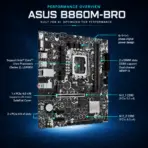
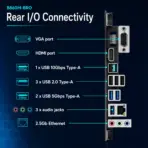
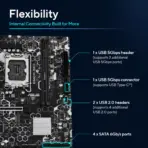
- Preserve the exact micro-ATX PCB proportions, LGA 1851 socket, two DDR5 slots, PCIe slots, dual M.2 positions, four SATA ports, chipset heatsink, rear I/O, capacitors, headers, connectors, printed markings and ASUS branding.
- Mount one complete motherboard naturally inside an open translucent micro-ATX chassis during a precise post-sale PC assembly.
- Keep the board unobstructed; do not install RAM, a graphics card, CPU cooler or SSD over its important components.
- Do not place the motherboard on a pedestal, showroom block, stage or floating retail slab.
Artistically Distinct and Detailed Background
- Create “The Opaline Neural Shipyard”, a surreal computing workshop where the motherboard is constructing an intelligent machine around itself from flowing data, memory and electrical architecture.
- In the foreground, form a delicate transparent robotic instrument measuring the empty LGA 1851 socket with concentric rings of frozen light, suggesting processor installation without inventing a CPU.
- In the midground, extend the board’s real traces into two vast conch-pearl memory canals. Let one canal accelerate into a brilliant PCIe 5.0 data singularity, while the second flows into a calmer PCIe 4.0 archive.
- Transform the 2.5Gb Ethernet route into an emerald glass bridge feeding a miniature interconnected data city.
- In the background, create an abstract AI laboratory where translucent geometric thoughts are assembled into organised files, models and application windows—symbolising AI-ready productivity without depicting unsupported software.
- Use mandatory dominant pearlescent opaline-white, secondary opaline-silver, smoked graphite, pale cyan and restrained emerald accents.
- Use only two textures: conch-pearl micro-swirled relief and thick transparent dichroic glass.
- Apply global illumination, controlled iridescence, intense caustic reflections, dielectric refractions and softly layered volumetric light. Use matte surfaces strictly minimally.
Icons — Bullet Listed
- Intel LGA 1851
- AI PC READY
- 2x DDR5 — 8800+MT/s OC
- PCIe 5.0 M.2 — 128Gbps
- PCIe 4.0 x16
- Realtek 2.5Gb Ethernet
- USB 10Gbps
- Front USB-C 5Gbps
- Advanced AI PC Ready
- Create every icon as a different freeform hollow 3D crystal structure with bold condensed wording fully enclosed and readable at thumbnail scale.
- Align the icons vertically along the right side without obstructing the motherboard.
- CRITICAL DIRECTIVE [STRICT] The Icons MUST Have different shapes depending on the specific content of the icon
Output Requirements
- Render exactly 2048 × 2048 pixels with a perfect square 1:1 ratio.
- Keep the product, logo, title, icons and background completely inside the canvas.
- Maintain extreme product sharpness and clean website-product hierarchy.
Constraints
- Do not invent WiFi, Bluetooth, RGB lighting, extra slots, additional heatsinks, ports or accessories.
- Do not create a poster, banner, vertical composition, wide layout or cropped preview.
- Avoid generic chrome, flat white emptiness, cheap plastic, excessive matte materials and decorative clutter.
- Brutally evaluate: “How does this image fare as a product-profile image?” Automatically correct every flaw before output.
- Follow the supplied five-part structure and strict image-generation requirements.